What is an AI Writer For Youtube Video Title and Why It Matters YouTube Video Title
YouTube titles need to attract clicks. AI Writer for YouTube Video Title helps create clear, catchy titles that make it easier to improve content discoverability and maximize view counts.
Try AI Writer Tool →Create Click-Worthy Titles That Drive Views
Your title is the first thing viewers see - make it count. Our AI generates attention-grabbing titles that balance curiosity, clarity, and SEO optimization. From...
Create Perfect Titles in 3 Simple Steps
- 1
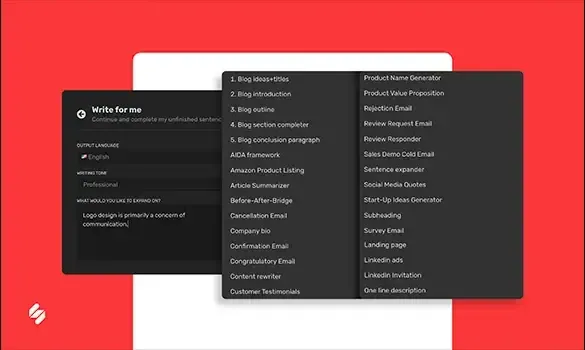
Describe Your Video Content: Input your video topic, main value proposition, and target audience. Include any keywords you want to rank for and the content format.
- 2
Review Title Options: Receive 10-15 optimized title variations using different formats and hooks. See CTR predictions and SEO scores for each option.
- 3
Select and Refine: Choose your preferred title or combine elements from multiple options. Customize to match your exact voice and publish with confidence.
Optimize for Both Search and Suggestions
Get titles that perform in YouTube search results and catch attention in suggested video feeds. Our AI balances keyword placement for discoverability with compelling language...
Frequently Asked Questions
What makes a YouTube title effective at getting clicks?
Effective titles combine three elements: curiosity that makes viewers want to learn more, clarity about what the video delivers, and keywords that help it appear in search results. The best titles promise specific value, use compelling language without being misleading, and communicate the video's benefit within the first few words where they're most visible.
How long should my YouTube video title be?
Aim for 60 characters or less. YouTube truncates titles after about 60 characters in search results and suggested video feeds, so your most important keywords and value proposition should appear early. The AI generates titles optimized for this length while ensuring your key message isn't cut off on any device.
Should I use ALL CAPS or emojis in my titles?
Use sparingly and strategically. ALL CAPS for one or two key words can draw attention, but entire titles in caps look like spam. Emojis can increase visibility in crowded feeds but may appear unprofessional for some niches. The AI recommends these elements based on what performs well in your specific content category.
How do I balance SEO keywords with engaging language?
The best titles integrate keywords naturally into compelling phrases rather than stuffing them awkwardly. The AI places your target keywords early in the title for SEO benefit while wrapping them in curiosity-driven or value-focused language that appeals to human readers. You rank in search AND get the click.
Can the AI help me avoid clickbait while still being compelling?
Yes. The AI is trained to create titles that are intriguing without being misleading. It generates titles that accurately represent your content while using proven psychological triggers like curiosity gaps, specific numbers, and benefit-focused language. You get clicks from interested viewers who will actually watch, improving your retention metrics.
Should my title match my thumbnail or be different?
They should complement each other, not duplicate. Your thumbnail grabs attention visually, while your title provides context and keywords. The AI can generate titles that work with common thumbnail approaches, ensuring the combination tells a complete, compelling story that maximizes click-through rates.
How often should I test different title styles?
Test regularly, especially when starting a channel or trying new content types. Generate multiple title options for each video and track which styles drive the best CTR in YouTube Analytics. The AI provides CTR predictions, but real performance data from your specific audience is the ultimate guide.
Can I change my video title after publishing to improve performance?
Yes. YouTube allows title changes, and updating underperforming video titles can breathe new life into old content. Use the AI to generate improved titles for videos that got low CTR, test the new titles, and monitor if views increase. Just ensure the new title still accurately represents the content.
What our 15 million+ users are saying about Simplified
Rated 4.6/5 across 5,008+ real reviews

The BEST for Social Media Scheduling...And I've Tried Them All
"This has been the only social media scheduler that I haven't ran into a million problems with. I appreciate that I can create content, upload and schedule it and not have to worry about whether or not it's going to actually post."

My ultimate solution to content rewritting and generation.
"Simplified. It's my ideal go-to tool when I need to generate content for my blog around specific topics. Their calendar scheduler also comes in handy."

Simplified is both the name and the perfect description
"Simplified makes it easy to manage a brand - or multiple brands. Within its 'simplified' interface, the social media management and scheduling lets you go directly from idea to implementation with a few intuitive clicks."

Simplified for Scheduled Posts
"Scheduling Posts through Simplified is one of the best features. It bypasses LinkedIn Scheduled Posts and enables easy delivery. Video addition features delineate platforms."

Not The Jack Of All Trades, The Master!
"Simplified is an AI writer, graphic design tool, video editor and social media scheduler. Four tools in one, streamlining my workflow and allowing me to unsubscribe from various other tools - saving me tonnes of cash."

An Innovative All-in-One Solution for Productivity and Engagement
"Simplified Platform's integration with marketing and social media tools streamlined my campaign management. The seamless connection to popular platforms allowed for efficient scheduling and posting of content."

The social media planner is so integrated
"The video editor saves me so much time. I love the social media planner especially because it's so integrated into the entire Simplified system. You can't find this anywhere else!"

All the gadgets a marketer needs
"It's so intuitive and streamlined that I actually started to believe I had superpowers myself. From social media management to data analytics, this app has all the gadgets a marketer needs."


Get Started with AI Writer on Simplified
Try Simplified's AI tools to level up your content creation & get more done.