Manage All Your Design Projects in One Place
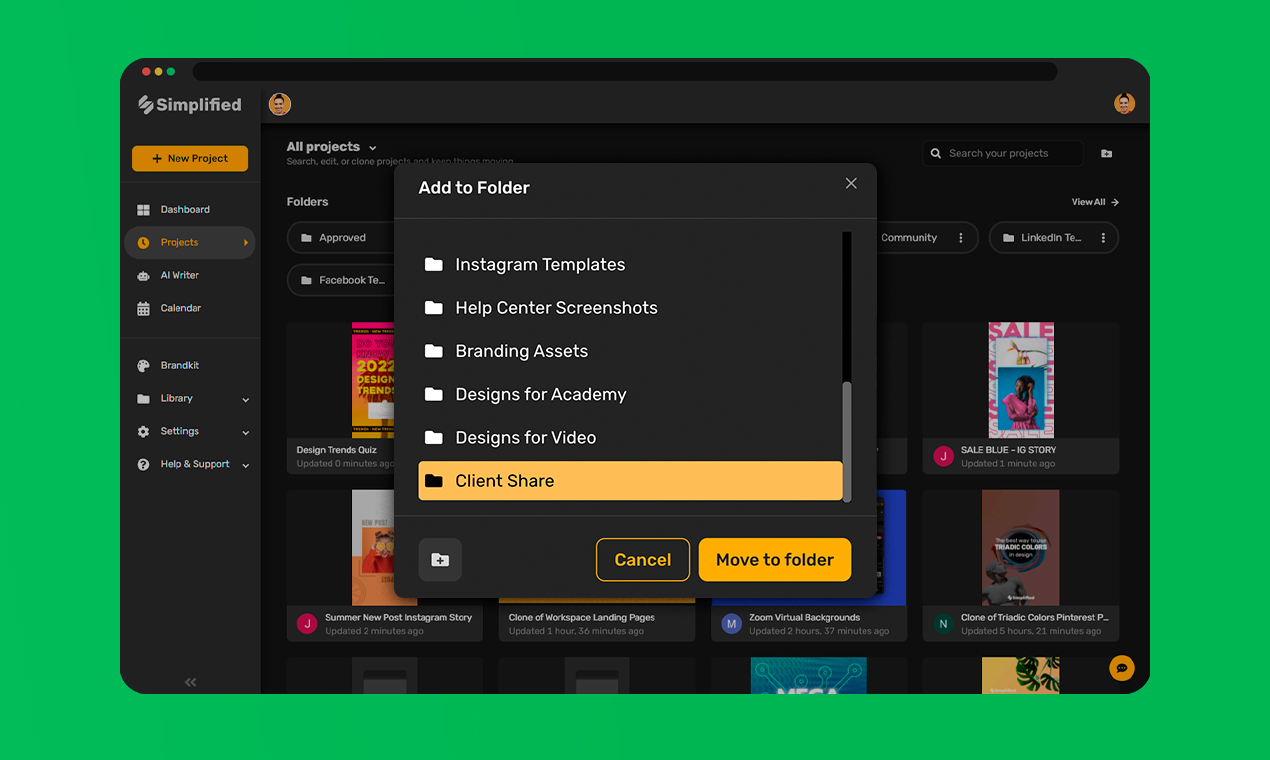
Locate Projects Quickly with Shared Folders
Create unlimited design folders to keep your projects moving! Store, organize, and update assets instantly and upload designs into shareable folders for easy access. Keep all your content in one place and help your team work smarter with Simplified's in-app collaboration.
Create Shared FoldersHow To Create New Folders
- 1
Click 'Library' on the left-side toolbar and choose 'Folders'.
- 2
Select 'Add Folder' to create a new folder.
- 3
To add projects, go to your Dashboard and click the '...' icon on the top right corner of the project, click 'Move to Folder' and select the folder you want.
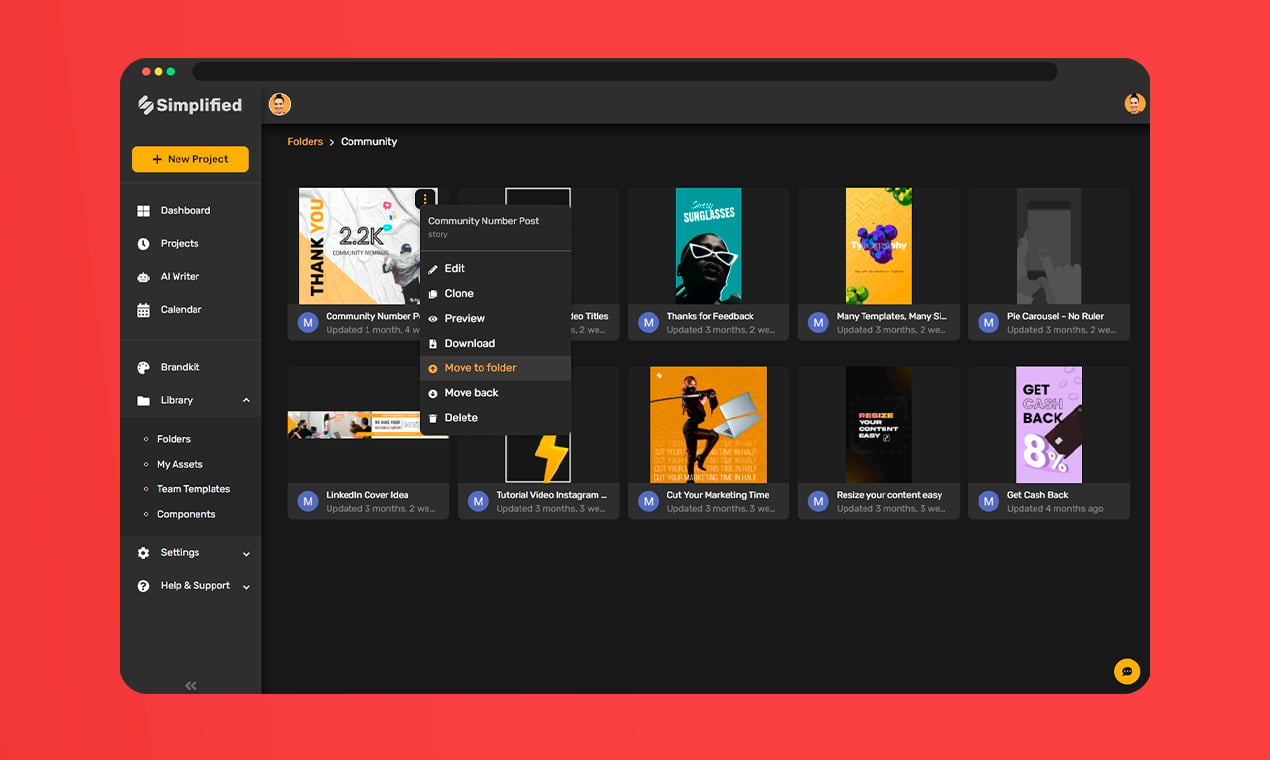
Simplify Your Workflow for Teams and Clients
Optimize workflows and find designs quickly with shareable folders. Set up folders by date, project, design type, client, and more! Access projects on any device anytime, connect your Google Drive for shared graphics, and watch your team edit content in real-time. Start, finish, and publish designs your team approves from the best online design platform.
Organize Shared Folders

Frequently Asked Questions
And some things you'd ask us.
How many folders can I create and share?
There is no limit on how many folders you can create for yourself or for shared workspaces. Once a team member is part of a workspace they have open access to all folders and can work with you in real-time to finalize designs, share ideas, and add items to folders.
Is there a free version of Simplified?
Yes! We have a Free Forever plan, which will stay free...forever. If you're an agency, freelancer, or team looking to use our essential features, this is the plan for you. Get unlimited design projects, 1000+ fonts, millions of photos and icons, thousands of templates, instant publishing, and 1GB of storage.
How does your pricing work?
Pricing starts at $0 for individuals and $30 for teams. Our pricing is based on two things: the number of team members on your plan and your billing period. We have four plans to choose from based on what you're looking for. See our pricing comparison at simplified.com/pricing.
How quickly can I get customer support?
Chat with us in-app or send us an email and we'll get back to you within 24 hours. We'd love to hear from you!
Easily Find and Share Folders for You and Your Team
Save time and money with free folder organization!


What Our 2 million+ Users Say About Simplified
One of the best collaborative design platform
I guess, there are so many reasons I like Simplified. Here I will mention some of those: Professional templates and rich libraries. It also comes with an AI writer for copies and long-form content. Comes with a Social Media Scheduler as well.

I love to use Simplified!
I use it every day, its my goto app for design and copy and marketing! Super amazing App.

I love it!
The simplicity of writing and designing in one app. Makes social media marketing a breeze.

SIMPLIFIED a Unique highly effective all in one app!
I like best that there are many features and explainer videos for each element you use. You have tons of different ways, and the name speaks for itself. SIMPLIFIED because it is straightforward and has everything in 1 software you could ever need.
I will not renew my Canva service next year.
Simplified will be my go-to design app!

Simplified is a loveable app
And I can confirm that from the moment I logged in. Simplified offers a nicely designed Dashboard with rich content, including links to various handy templates. When I dug deep into the app, it was an amazing experience.

The magic resize looks pretty amazing.
Resizing on other design platforms is not intuitive and requires quite a bit of rework. Well done and congrats on the launch!

How Simplified Saved My Small Business
The AI writer, the brand assets where you can add brand colors. I adore the templates, they're very interactive and so customizable. I love it!

Great UI and make design easier. A time saver.
Im a photoshop user for over 10 years, first time trying out this tool, instantly hook me in, really easy to use and the ability to create different sized images is a really huge plus point.
Like the name, the Software is also very SIMPLE to use
Simple aspects of good content panels, including links to many valuable templates to create great content. It was a wonderful experience when I entered the program.
Simplified is Awesome!
Well to quickly sum up, if you are into design, social media advertising, writing blogs and so much more, this program is for you. I am honestly stunned as to what it offers. Its great.

Best Investment ever!
Social share images are an important part of building reader engagement. The better the quality, the longer your visitor is spending there, the more likely to reach out for any kind of "call to action", including purchasing.