By
By Video content marketing has become one of the most powerful tools for connecting with audiences online. In 2026, its impact continues to grow as more people prefer watching short, visual stories instead of reading long posts. Whether it’s a product demo, tutorial, or brand story, video helps businesses communicate ideas faster and in a more relatable way.
Recent studies show that over 90% of online users watch videos every week, and brands that use video are seeing higher customer attention and better message recall. This makes it clear that video is not just an option anymore—it’s a central part of every marketing plan.
Today, AI-powered tools are changing the way teams create videos. With platforms like Simplified, marketers can generate, edit, and publish videos within minutes, even without technical skills. These tools make it possible to focus more on storytelling while maintaining consistent branding and style.
As you move through this guide, you’ll learn how to plan a complete video content marketing strategy, what tools can support your goals, and what trends to follow in 2026 to stay ahead of the competition.
In this guide, you’ll discover:
- Understanding Video Content Marketing
- Key Components of a Strong Video Marketing Content Strategy
- Step-by-Step Video Content Marketing Plan for 2026
- How Simplified’s AI Video Tools Help in Video Marketing (with Tools)
- Case Studies: Real Customer Experiences
- Trends to Watch in 2026 for Video Marketing
- Common Mistakes in Video Content Marketing
- Best Practices for Video Content Strategy
- Final Thoughts
- FAQs related to Video Content Marketing
Understanding Video Content Marketing
Lets understand “what is video content marketing”. Video content marketing is the practice of using videos to promote a brand, product, or message. Instead of relying only on text or images, businesses use videos to tell stories, explain ideas, and build stronger connections with viewers. The goal is to share useful information in a way that keeps the audience interested and encourages them to take action—like visiting a website, subscribing, or making a purchase.
In 2026, the scope of video marketing has grown far beyond traditional advertising. Brands now use it for product launches, customer testimonials, tutorials, webinars, and even user-generated content. Short-form videos on platforms like TikTok, YouTube Shorts, and Instagram Reels are becoming essential for quick reach, while long-form videos still play a key role in building trust and authority.
What makes video stand out is its ability to communicate complex ideas in seconds. A single clip can show how a product works, highlight its benefits, and connect emotionally with viewers—all at once. This is why marketers see higher retention rates and stronger recall from video campaigns compared to other content types.
Whether you are a small business or part of a large marketing team, video content marketing gives you the flexibility to share your story in a format your audience prefers.
Key Components of a Strong Video Marketing Content Strategy
A well-structured video content marketing strategy helps you stay consistent, organized, and focused on your goals. Before creating videos, it’s important to understand what drives a strong plan. Here are the main elements every brand should include:
1. Audience Research
Start by identifying who your viewers are and what kind of content they enjoy. Look at their age, location, interests, and preferred platforms. When you understand your audience, it becomes easier to decide what stories to tell and how to tell them.
2. Goal Setting
Every video should serve a purpose. Some aim to raise brand awareness, while others focus on generating leads or increasing conversions. Setting clear goals helps you measure success and know which videos perform best.
3. Platform Choice
Different platforms serve different audiences. YouTube is ideal for tutorials and long-form videos, while TikTok and Instagram favor short, fast-paced clips. LinkedIn works best for professional insights or company stories. Choose the channels that match your target audience and content goals.
4. Content Planning
Consistency matters in video marketing. Create a calendar that outlines what type of videos you’ll post and when. AI-powered tools, such as those offered by Simplified, can help you organize topics, write scripts, and plan distribution across multiple platforms.
5. Performance Tracking
Once your videos are live, track their results. Metrics like watch time, click-through rate, and shares reveal how well your content performs. Use this data to refine your future videos and focus on what your audience responds to most.
When these components work together, your video content marketing plan becomes more structured and goal-driven, helping you stay clear about what’s working and where to improve.
Bonus: How to Use AI Clips for Videos in Marketing Campaigns
Step-by-Step Video Content Marketing Plan for 2026
Creating an effective video marketing strategy involves more than just producing videos. It requires planning, consistency, and regular review. The following step-by-step plan outlines how you can build and manage a strong video marketing workflow in 2026.
Step 1: Research and Planning
Begin by researching what your target audience wants to watch. Use keyword research tools and social media insights to spot trending topics in your niche. This step helps you create videos that align with audience interests and current market trends.
Step 2: Script Writing
A clear script keeps your video focused and easy to follow. You can use AI writing tools to generate outlines or full scripts in seconds. This helps save time while keeping your messaging consistent across all your video content.
Step 3: Video Creation
Once your script is ready, you can create videos using AI-powered platforms like Simplified. It allows you to turn text into videos using templates, stock clips, voiceovers, and transitions—all within one workspace. This makes video creation faster and more accessible for both marketers and small businesses.
Step 4: Editing and Branding
Editing adds polish to your video. Include captions, background music, and brand elements such as your logo or color palette. Tools within Simplified can help maintain visual consistency while allowing easy customization for each platform.
Step 5: Publishing and Scheduling
Timing matters in video marketing. After editing, schedule posts for when your audience is most active. Consistent posting builds recognition and helps your videos reach more viewers across platforms like YouTube, Instagram, and LinkedIn.
Step 6: Analytics and Optimization
Finally, track your video performance. Review metrics such as views, watch time, and comments. Use this data to refine future scripts, adjust formats, or test new styles. Over time, this process helps you create content that performs better with each campaign.
When you follow these steps, your video marketing process becomes organized and goal-oriented, allowing your team to focus on creativity and storytelling rather than repetitive manual tasks.
Bonus: AI Clips for Social Media: The Best Way to Repurpose Video
How Simplified’s AI Video Tools Help in Video Marketing
AI has changed how teams plan and produce videos, making the process faster and more flexible. Simplified’s AI video tools give marketers, creators, and small businesses a single workspace to create, edit, and repurpose videos without switching between different apps.
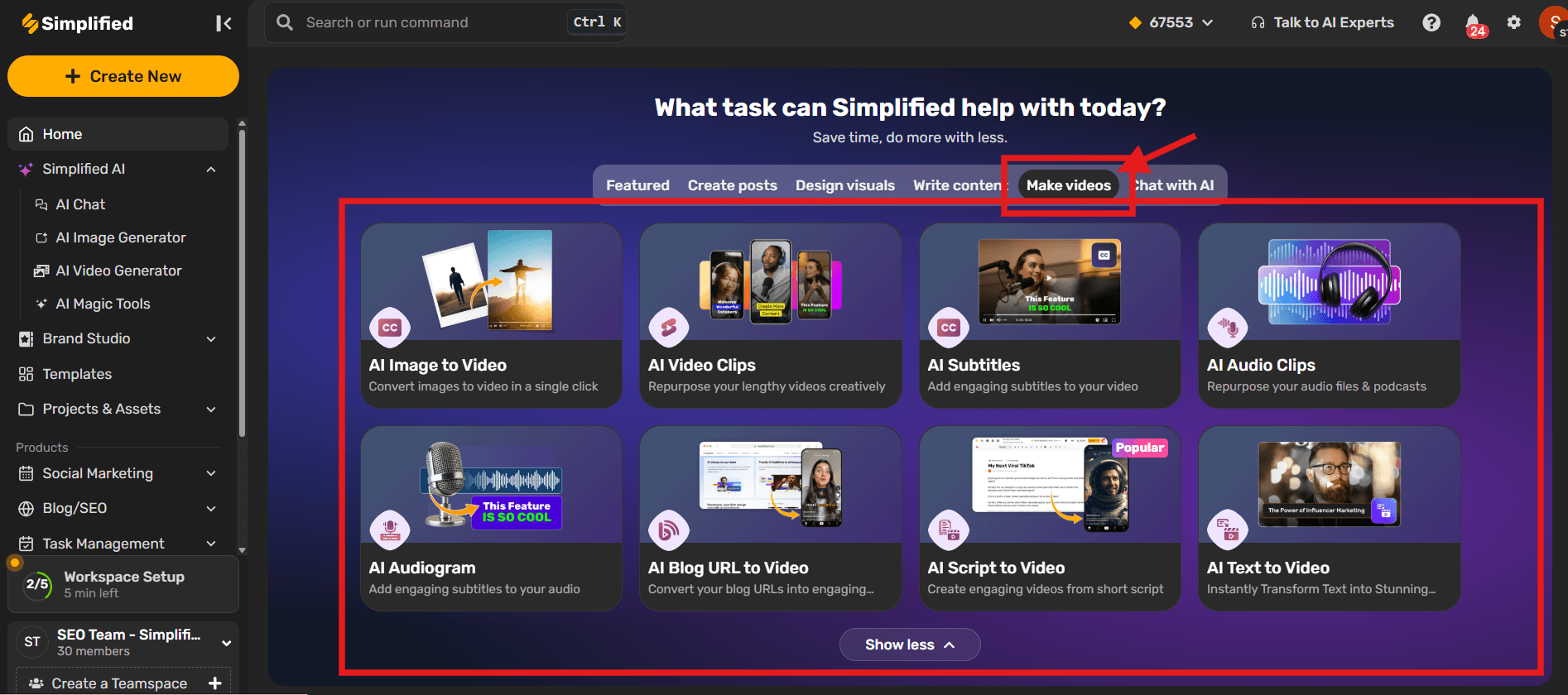
Below are the main AI video tools available on Simplified and how each one supports your video content marketing workflow:
AI Image to Video
AI Image to Video can turn static images into engaging motion videos with just in few minutes. This feature helps create visual stories from photo libraries, making it perfect for social media highlights or product showcases.
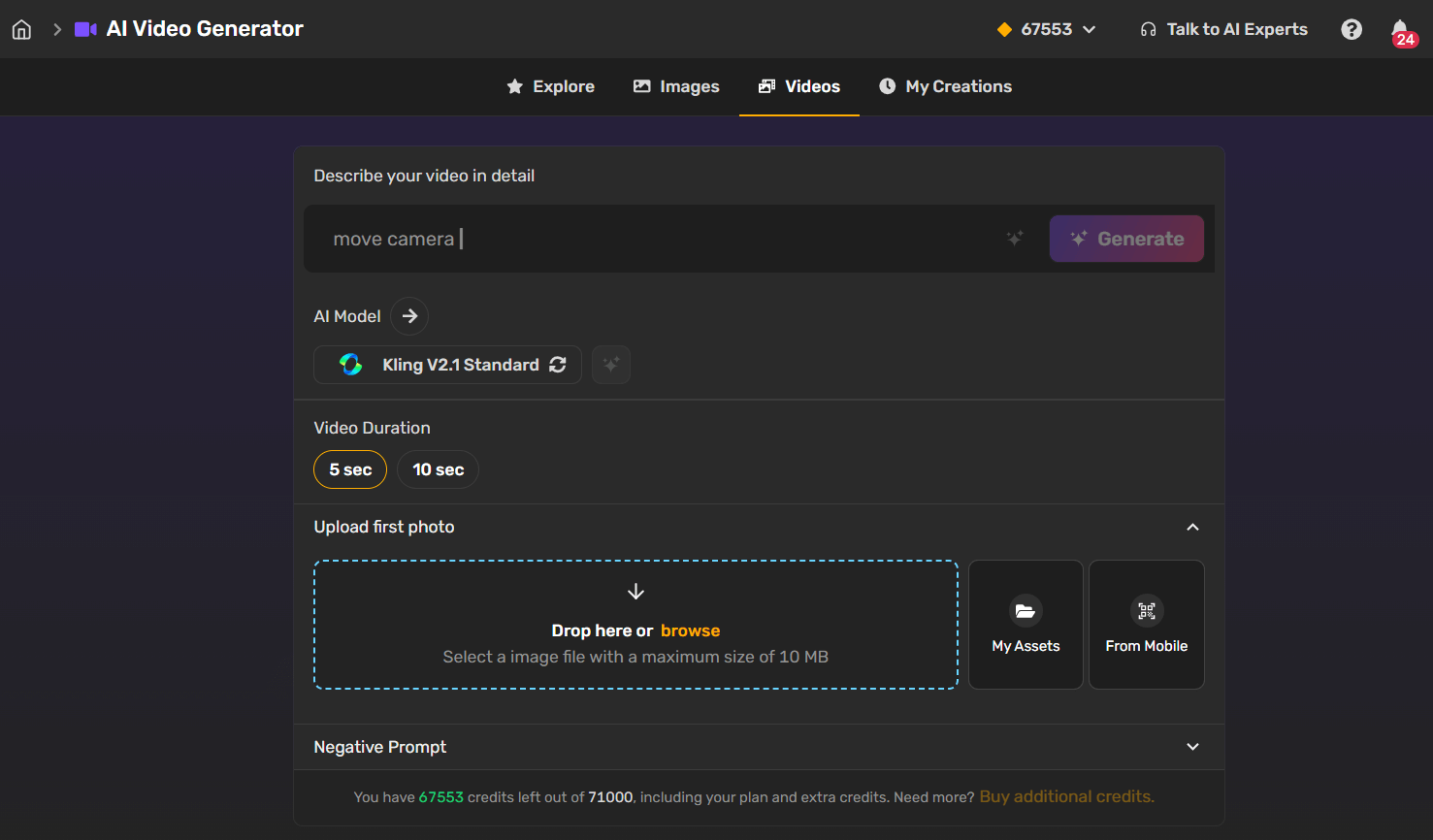
Steps to Use AI Image to Video Tool
- Sign up or log in to your Simplified account and open the Make Videos section.
- Select the AI Image to Video tool from the list of available video tools.
- Enter your text prompt. You can refine it using the Magic Prompt option before clicking Generate.
- Choose your preferred AI model based on the style or output you want.
- Select the video duration that fits your project needs.
- Upload your image if you want it to appear as a moveable element in the video.
- Add a negative prompt if there are specific details you want the AI to avoid.
- Click the Generate button at the top to create your video instantly.
AI Video Clips
AI Clips repurpose long videos into shorter clips that fit platforms like TikTok, Instagram Reels, or YouTube Shorts. It helps you keep your content active across multiple platforms without starting from scratch.
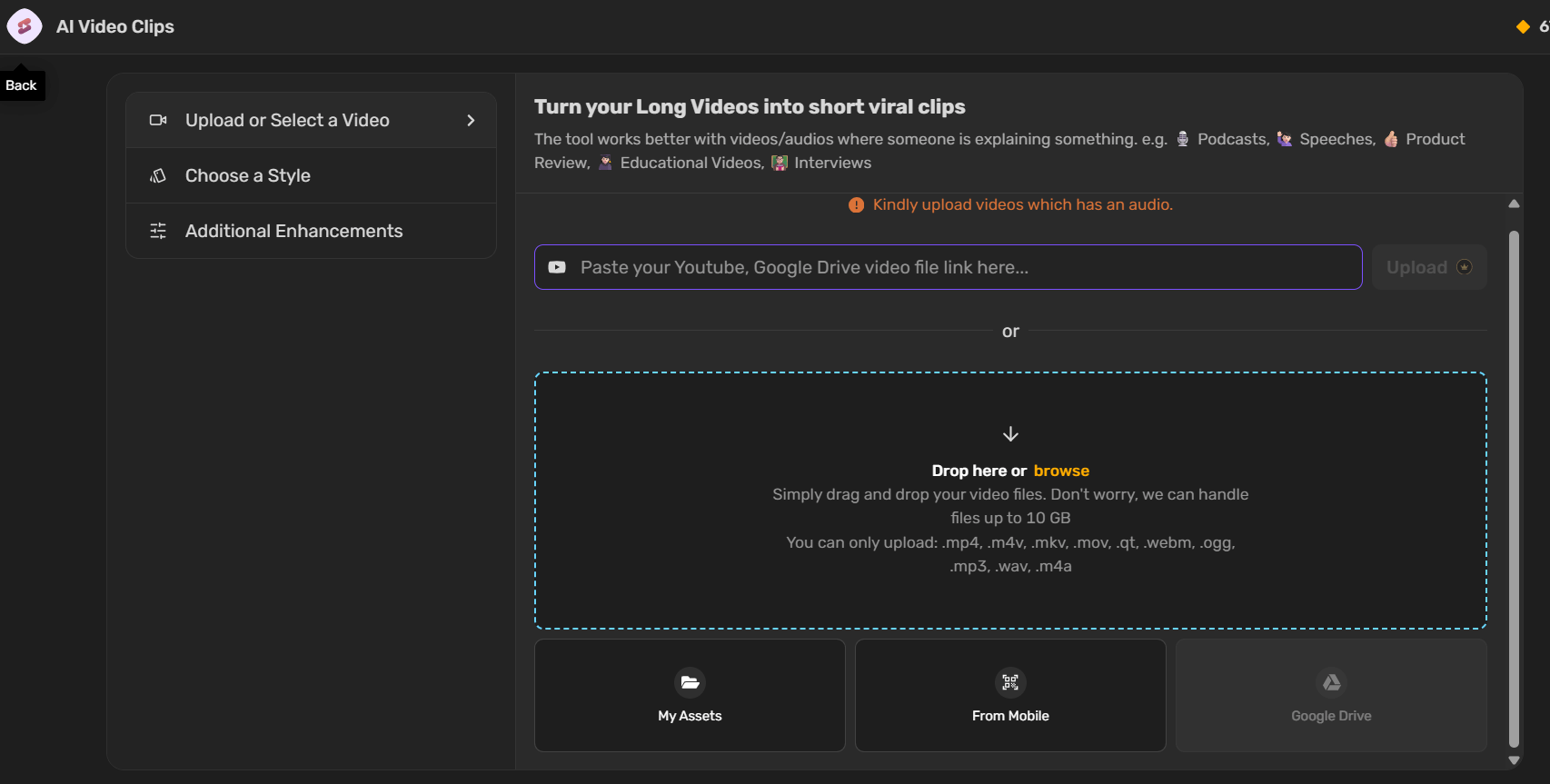
Steps to Use AI Video Clips
- Sign up or log in to your Simplified account and open the Make Videos section.
- Select the AI Video Clips tool from the list of available video tools.
- Upload your video by adding a YouTube link, Google Drive file link, or dragging and dropping it directly. Then, click Upload.
- Select a template or style (optional) to match your content’s tone or format.
- Set your preferences such as video language, clip size, duration, and layout.
- Choose whether to hide the Simplified watermark based on your needs.
- Personalize your clip using your brand kit if you want to keep it consistent with your brand identity.
- Click Generate to create your video clips automatically.
- Review the generated clips and make any adjustments before saving or sharing.
AI Subtitles
Auto subtitle generator adds accurate subtitles automatically to your videos. Subtitles improve accessibility and allow viewers to follow along, even when the sound is off.
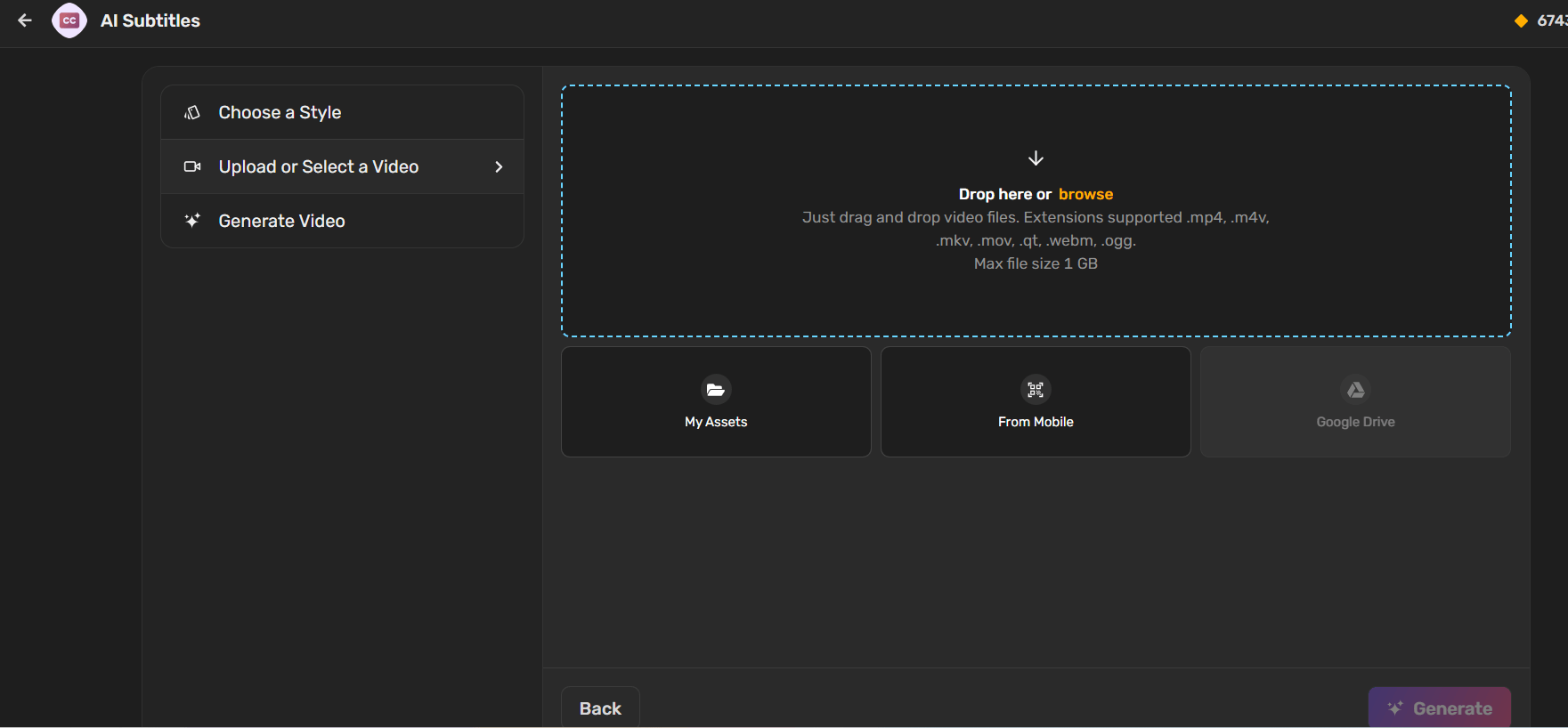
Steps to Use AI Subtitles
- Sign up or log in to your Simplified account and open the Make Videos section.
- Select the AI Subtitles tool from the list of available video tools.
- Choose a template or subtitle style (optional) to match your content’s tone and format.
- Upload your video, select the spoken language, and click the Generate button.
- Review your generated video to ensure the subtitles and visuals match your preferences.
AI Audio Clips
AI Audio Clips tool converts audio or podcast files into shareable video content. This tool is great for turning spoken-word content into visuals for social channels.

Steps to Use AI Audio Clips
- Sign up or log in to your Simplified account and open the Make Videos section.
- Select the AI Audio Clips tool from the list of available video tools.
- Upload your video file that you want to convert into audio clips.
- Choose a template or subtitle style, then click the Next button to continue.
- Set your preferences — select the language spoken in the audio, choose a cover, clip size, and duration.
- Click the Generate button and review your newly created audio clips for accuracy and presentation.
AI Audiogram
AI audiogram tool adds subtitles and visual sound waves to your audio clips to make them more interactive and appealing for social feeds.

Steps to Use AI Audiogram
- Sign up or log in to your Simplified account and open the Make Videos section.
- Select the AI Audiogram tool from the list of available video tools.
- Choose a template or style (optional) to match your content’s tone.
- Upload your audio file (supported formats:
.mp3,.wav,.m4a; maximum file size: 1 GB). - Select the spoken language and click the Generate button to create your audiogram.
- Review your audio transcript and export it in your preferred format.
AI Blog URL to Video
Paste any blog URL, and the tool automatically converts the article into a video format with visuals, voiceover, and captions. This helps in repurposing written content for wider reach.

Steps to Use AI Blog URL to Video
- Sign up or log in to your Simplified account and open the Make Videos section.
- Select the AI Blog Url to Video tool from the list of available video tools.
- Choose your Brandbook or customize settings by selecting creativity level, output language, and tone.
- Add your blog URL to automatically generate the video script.
- Review and finalize the script or use the AI Assistant to refine it, then click Continue.
- Select the video size, media source, and AI speaker for narration.
- Click Generate to create your video and review the final output.
- Export the video in your preferred format for sharing or publishing.
AI Script to Video
Turn short scripts or ideas into ready-to-share videos. This tool is ideal for marketers who want to produce explainer videos, product walkthroughs, or campaign ads quickly.
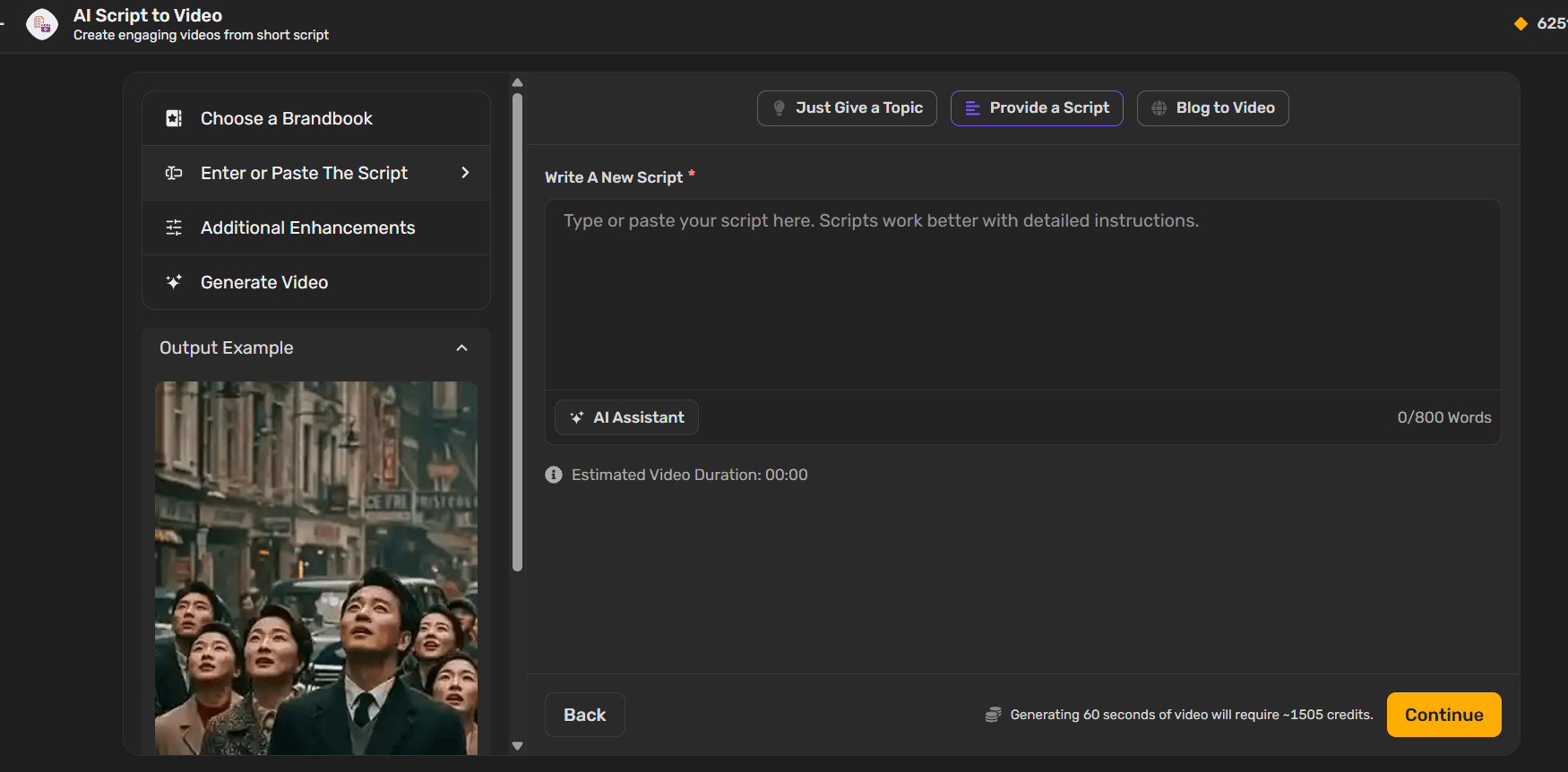
Steps to Use AI Script to Video
- Sign up or log in to your Simplified account and open the “Make Videos” section.
- Select the “AI Script to Video” tool from the list of available video tools.
- Choose your Brandbook or customize settings by adjusting creativity level, output language, and tone.
- Add your script or use the AI Assistant to refine it, then click Continue.
- Select the video size, media source, and AI speaker for narration.
- Click Generate to create your video and review the final result.
- Export your video in your preferred format for easy sharing or publishing.
AI Text to Video
AI Text to Video tool converts plain text into professional-looking videos with transitions, stock visuals, and background music—all in one click.
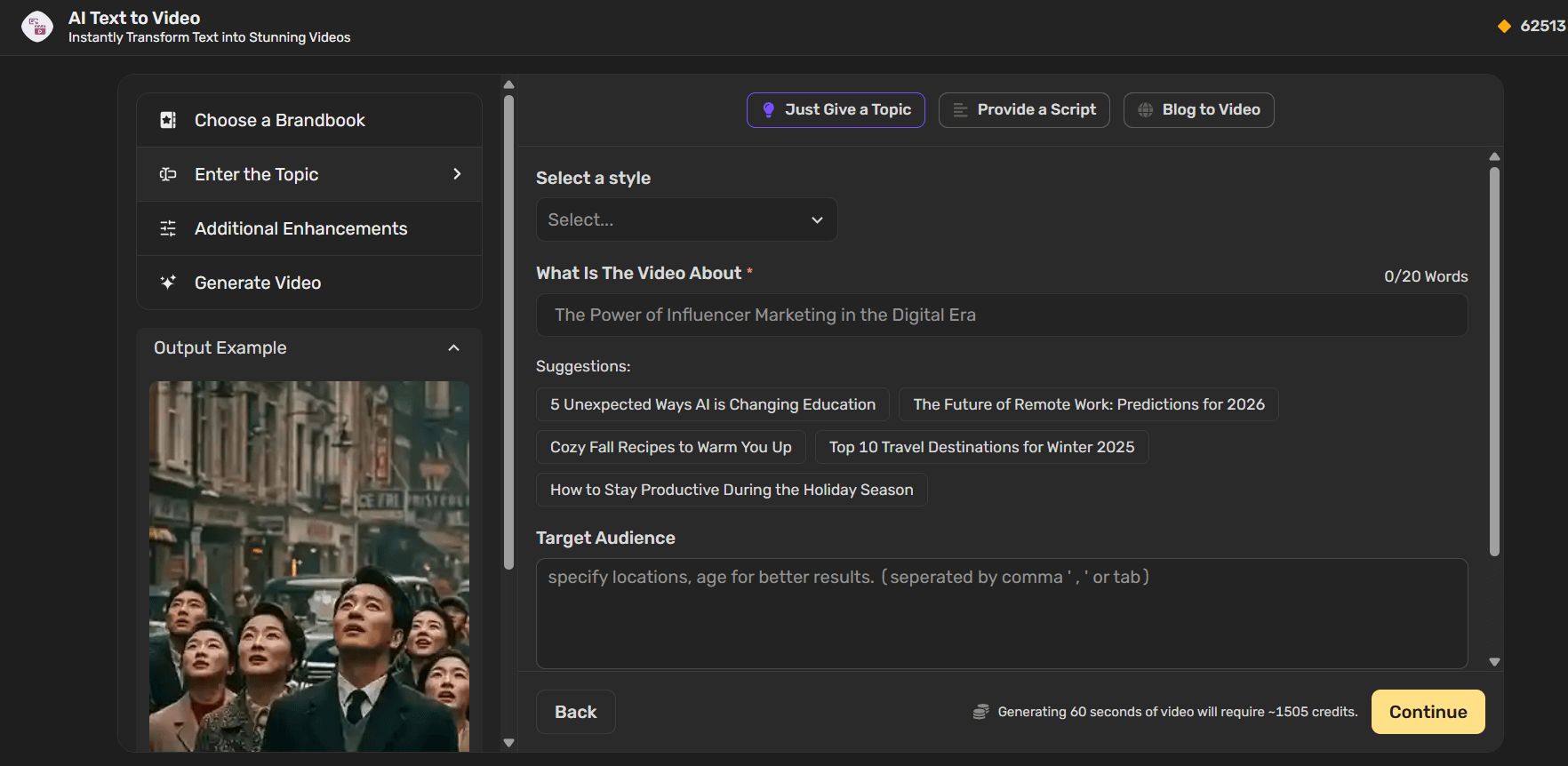
Steps to Use AI Text to Video
- Sign up or log in to your Simplified account and open the Make Videos section.
- Select the AI Text to Video tool from the list of available video tools.
- Choose a style and add your video topic (in up to 20 words), along with your target audience and video duration.
- Select the video size, media source, and AI speaker for narration.
- Click Generate to create your video and review the final output.
- Export your video in your preferred format for sharing or publishing.
More AI Video Editing Tools
In addition to AI-based tools, Simplified also provides essential video editing options under its Video & Podcast section:
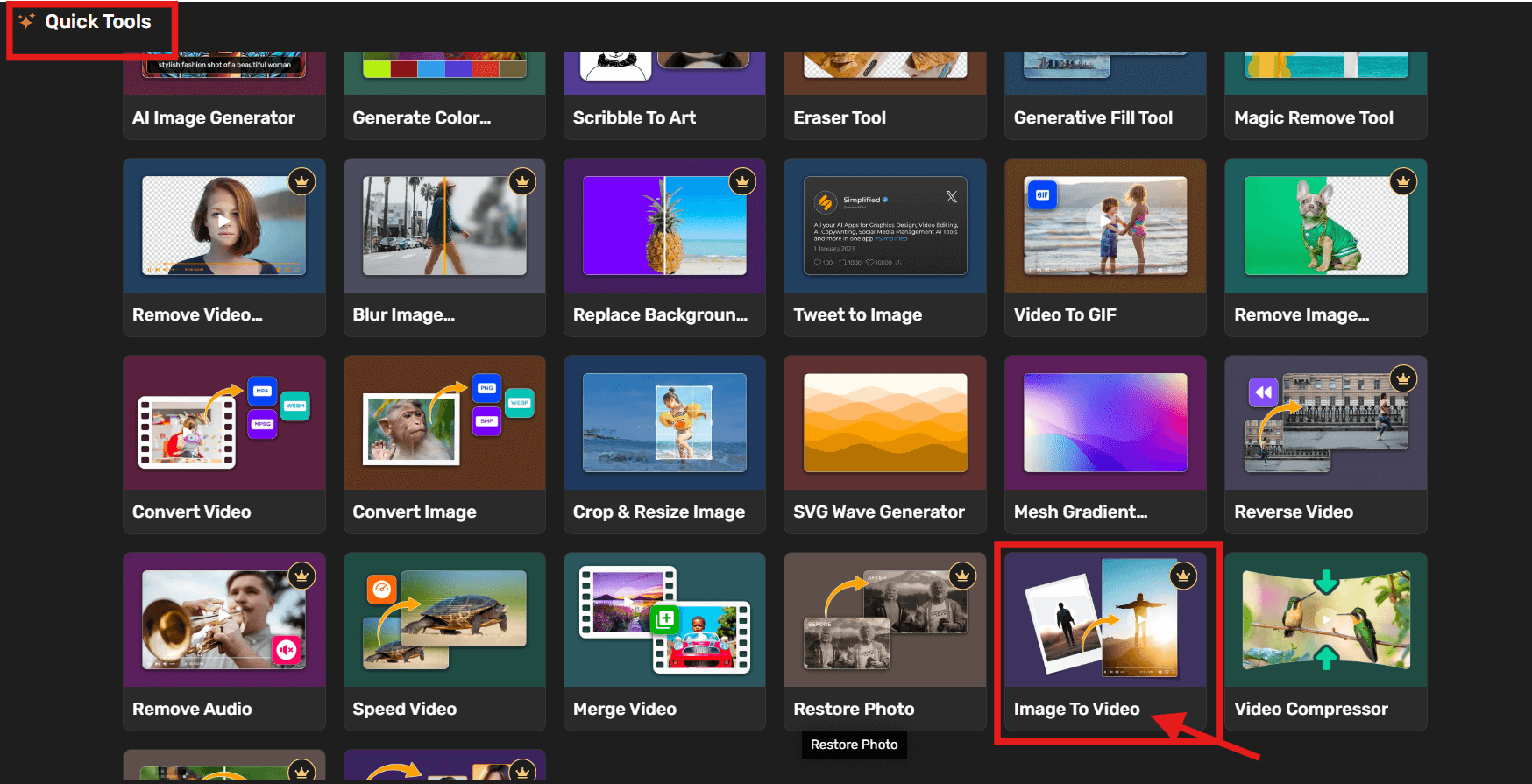
1. Video Background Remover – for clear subject focus
Automatically removes the background from your videos, keeping the subject in focus. It’s ideal for product demos, tutorials, or social clips where you want to place your subject over a clean or branded backdrop.
2. Video to GIF Converter – for quick social media snippets
Easily turn short video clips into GIFs for social media, messages, or ads. It helps you repurpose content into lightweight, shareable animations that grab attention quickly.
3. Video Converter – for multiple formats
Upload and convert your videos into different formats such as MP4, MOV, or AVI without losing quality. This makes it easy to share your content across platforms or devices that support specific file types.
4. Reverse Video – for creative storytelling
Add a playful or dramatic effect to your content by reversing the video sequence. It’s great for behind-the-scenes clips, creative transitions, or storytelling with a unique visual twist.
5. Remove Audio From Video
Easily remove unwanted background noise or mute a video entirely. You can also replace the existing sound with new music, a voiceover, or cleaner audio for a polished final output.
6. Speed Video – for slow or fast-motion effects
Adjust your video’s playback speed to create either a slow-motion cinematic look or a fast-paced highlight reel. This tool helps emphasize key moments or add energy to your visuals.
7. Merge Video – to combine clips
Join multiple video clips into a single, continuous video. Perfect for creating compilations, tutorials, or product overviews without complex editing.
8. Video Compressor – to reduce file size without losing quality
Compress large video files while keeping the resolution clear. This tool helps optimize videos for faster uploads, smoother sharing, and easier storage.
If you want to check out these tools Click here.
Case Studies: Real Customer Experiences
“A simply with multi-function web design tool helps my digital marketing job become easier! ” By elvis chee Source: TrustPilot

“Great Design and video experience. The ability to record my own voice or ad AI Voice is soo convenient” By Carlos Jairo Source: TrustPilot
“I really like how Simplified combines design, video editing, AI writing, and team collaboration in one platform. The templates are modern and diverse, which saves a lot of time. The AI tools for generating marketing copy and social content are especially helpful for boosting productivity. It also integrates well with social media platforms, so publishing directly from the app is very convenient.“ By Sidath P. Source: G2
“I love how easy Simplified makes content creation. The intuitive design, great templates, and AI-powered tools make it quick to produce high-quality graphics, videos, and posts. It’s all-in-one, so I don’t need multiple tools anymore.“ By Alove V. Source: G2
“Everything is integrated: No need to switch between 5 different tools.” Simplified is a total game-changer. It helps you do more with less—less time, less money, and less stress. While it’s not a replacement for every high-end tool out there, it’s definitely powerful enough to handle 80% of your daily content and marketing needs. By Mohan G. Source: G2
Bonus: Can AI Workflows Make Your Sales Automation Smarter and Faster? Here’s How
Trends to Watch in 2026 for Video Marketing
The video marketing landscape continues to change quickly, shaped by audience behavior, AI advancements, and social media platform updates. As you plan your content strategy for 2026, here are the top trends to keep in mind.
1. AI-Generated and Personalized Videos
Artificial intelligence is now central to content creation. Marketers are using AI tools to generate personalized videos based on user interests, purchase history, or browsing habits. This approach helps brands connect with viewers through content that feels relevant and timely.
Simplified’s tools—like AI Script to Video and AI Text to Video—make this process easier by converting written content into videos that match brand tone and visual style.
2. Short-Form Video Growth
Short-form content continues to dominate on platforms such as TikTok, Instagram Reels, and YouTube Shorts. Viewers prefer quick, informative clips that deliver value in under a minute. Businesses are now adapting their longer videos into short, snackable versions to fit this fast-paced format.
3. Interactive and Shoppable Videos
Interactive elements—like clickable links or embedded product tags—are changing how audiences shop and learn online. Shoppable videos let users explore products and make purchases directly from the video itself. This feature is gaining traction across e-commerce brands and influencers alike.
4. Cross-Platform Repurposing
Instead of creating new content for every channel, marketers are repurposing existing videos for different platforms. A single long-form YouTube video can be turned into multiple short clips, GIFs, or audiograms. Tools like Simplified’s AI Video Clips and Video to GIF help teams adapt content for each platform while saving time.
5. Focus on Authentic Storytelling
Viewers are becoming more selective about the content they watch. Brands that share genuine stories or behind-the-scenes clips often see stronger responses. Authenticity, relatability, and a clear message now matter more than high-end production.
6. Data-Driven Video Optimization
In 2026, analytics will continue to guide decision-making. Tracking metrics such as retention rate, average watch time, and viewer demographics helps marketers understand what works. By combining insights with AI, teams can predict content performance and adjust their strategies accordingly.
Keeping up with these trends helps marketers stay relevant and maintain consistency in their campaigns. As video continues to lead digital marketing, businesses that plan ahead and adapt to these changes will see stronger audience connections and better long-term results.
Bonus Artices: How to Use AI for Marketing: Complete Beginner’s Guide
Common Mistakes in Video Content Marketing
Even with powerful AI tools and clear strategies, many brands still make small missteps that limit their video performance. Recognizing these mistakes can help you create content that not only looks good but also meets your business goals.
1. Ignoring the Target Audience
One of the most common mistakes is creating videos without a clear understanding of who the audience is. When content tries to speak to everyone, it connects with no one. Successful marketers study their audience’s interests, demographics, and preferred platforms before planning each video.
2. Overlooking Storytelling
Many brands focus too much on selling and forget storytelling. Audiences engage better when there’s a clear narrative—whether it’s showing a customer experience, a behind-the-scenes clip, or a journey of product creation. A good story builds trust and makes the message memorable.
3. Poor Video Length and Structure
Viewers have short attention spans. Videos that are too long or take too much time to get to the main point lose engagement fast. Start with a strong hook in the first few seconds and keep the message concise. Shorter videos tend to perform better on platforms like Instagram and TikTok, while YouTube allows more detailed storytelling.
4. Ignoring Captions and Accessibility
Accessibility is often overlooked. Adding captions, subtitles, or visual cues ensures your videos are understood by a wider audience, including those watching without sound. It also improves viewer retention and SEO rankings since search engines can index video transcripts.
5. Skipping the Call-to-Action (CTA)
Every video should guide the viewer toward an action—whether it’s visiting a website, subscribing, or sharing. Without a clear CTA, you miss the opportunity to convert engaged viewers into customers or followers. Make sure your CTA fits naturally within the video instead of feeling forced.
6. Inconsistent Branding
Using inconsistent colors, tones, or visual styles across videos can weaken brand recognition. Maintaining a uniform look and feel helps build familiarity and trust over time. Simplified’s Brand Kit and video templates can help keep this consistency across campaigns.
7. Not Optimizing for Each Platform
A video that performs well on YouTube might not work the same way on Instagram or LinkedIn. Each platform has its own audience behavior, preferred length, and format. Adapting your content for each one ensures better visibility and engagement.
8. Forgetting About Analytics
Publishing a video without analyzing its performance is like marketing in the dark. Metrics such as view count, watch time, and engagement rate show what’s working and what’s not. Consistent review helps you refine your content strategy and improve future videos.
Avoiding these common mistakes allows brands to create videos that are not only visually appealing but also meaningful and results-driven. Small adjustments—like optimizing video length or adding captions—can have a lasting impact on your overall performance.
Bonus: How to Compress Videos for YouTube, Instagram, and WhatsApp: A Step-by-Step Guide
Best Practices for Video Content Strategy
A strong video strategy doesn’t rely on luck — it’s built on planning, creativity, and consistent review. Whether you’re creating short clips for social media or detailed product walkthroughs, these best practices will help you create content that connects and performs.
1. Start with a Clear Purpose
Every video needs a reason to exist. Before hitting record, decide what you want viewers to do after watching. Do you want them to learn something, explore your product, or share the content? Setting one clear goal per video keeps your message focused and makes it easier to measure success.
2. Match Videos to the Customer Journey
Think about where your audience is in their buying process.
- Awareness stage: Create educational or entertaining videos that introduce your brand.
- Consideration stage: Share testimonials or comparison videos that address questions.
- Decision stage: Use demos or case studies that highlight real results.
This structure helps guide viewers step by step instead of overwhelming them with too much information upfront.
3. Post Consistently
Audiences respond better when they know what to expect. A consistent posting schedule builds trust and keeps your content visible across platforms.
Simplified’s social media scheduler can help you organize upload times, so you stay on track without needing to manage every post manually.
4. Focus on Quality and Clarity
High production value isn’t about expensive equipment—it’s about clarity. Make sure your message is easy to understand, your visuals are clean, and your audio is crisp. A short, well-edited video will always outperform a longer one that feels confusing or cluttered.
5. Use Storytelling to Build Connection
Stories make information easier to remember. Even a short product video should follow a simple story arc: set up a problem, show how your solution helps, and end with a takeaway.
Storytelling adds context to your message and keeps viewers watching until the end.
6. Design for Mobile First
Most viewers now watch videos on their phones, so design with small screens in mind. Use large text, clear visuals, and vertical or square formats. Always preview how your video looks on mobile before publishing to ensure it plays smoothly across devices.
7. Add Captions and Subtitles
A large percentage of viewers watch videos without sound, especially on social media. Adding captions keeps your message clear and inclusive. Simplified’s AI subtitle tool automatically generates captions that sync with your voiceover, saving you from manual editing.
8. Repurpose Your Existing Videos
Instead of creating new videos from scratch, reuse what you already have. Turn a webinar into a series of short clips, convert tutorials into Reels, or extract quotes for social posts. Simplified’s AI Video Clips feature makes repurposing quick and organized, helping you get more out of every video you make.
9. Track and Learn from Your Data
Publishing videos without checking results wastes valuable insights. Monitor views, retention rates, and audience behavior. When you know which formats perform best, you can adjust future videos for better reach and engagement. Simplified’s analytics make it easier to compare performance across platforms.
In 2026, successful video marketing is about being consistent, purposeful, and adaptable. Focus on creating videos that inform, entertain, and build trust—because when viewers find value in your content, they’ll come back for more.
Final Thoughts
Video content has become a cornerstone of digital marketing in 2026. Whether you’re running a small business, managing an e-commerce brand, or growing your online presence, videos help you connect with audiences in ways text and images can’t.
The key isn’t just producing videos—it’s building a plan that aligns with your goals. From setting clear objectives and knowing your audience to creating consistent, high-quality content, every step adds value to your overall strategy.
If you’re just starting, focus on one platform and one type of video before expanding. Experiment, review your performance, and adjust based on what resonates most with your viewers. Even small improvements—like clearer storytelling or consistent posting—can make a noticeable difference.
And remember, you don’t need a full production team to create strong video content. AI-powered tools like Simplified make it easier to plan, edit, and publish videos all in one place. You can create everything from social clips to brand explainers while saving time and staying consistent.
FAQs: Video Content Marketing in 2026
1. What is video content marketing?
Video content marketing is the practice of using videos to share your brand message, educate audiences, or promote products and services. It includes everything from short social clips and explainers to product demos and customer stories—helping businesses connect with people through visual storytelling.
2. How to do video content marketing?
Start by setting clear goals—like increasing brand visibility or driving conversions. Outline a content plan, decide on platforms, and create videos that match your audience’s preferences. Use AI video tools to save time on editing and captions, then track performance metrics such as views, watch time, and engagement rate to refine your strategy.
3. Why use video content marketing?
Video is one of the most powerful ways to communicate online. It captures attention faster than text, helps people remember your message, and works well across different marketing channels. Whether it’s social media, email, or your website, videos make it easier for audiences to understand your brand and take action.
4. When creating video marketing content on a budget, what should I focus on?
Focus on planning and clarity. A strong idea matters more than high-end production. Use natural lighting, record with your phone, and rely on AI video platforms for quick edits, captions, and templates. Keep videos short, authentic, and aligned with your brand message.
5. When looking to create video content for your marketing strategy, what’s the first step?
Start by defining your goal—brand awareness, customer education, or lead generation. Then research your audience and decide what types of videos will reach them best. Once you have clarity on both, you can plan your topics, choose the right format, and schedule consistent posting.
6. How to use video content in B2B SaaS marketing?
In B2B SaaS, videos are useful for simplifying complex ideas. Create explainer videos to show product value, short tutorials for onboarding, and customer testimonials to build trust. Sharing these across LinkedIn, YouTube, or your website helps potential clients understand your product faster and make informed decisions.
Start Creating Smarter Video Content Today
Video content marketing in 2026 isn’t just about keeping up—it’s about communicating with clarity, purpose, and authenticity. The good news? You no longer need a full production crew or expensive software to compete with big brands.
AI-powered video tools, like the ones from Simplified, make it possible for anyone to plan, edit, and publish professional-quality videos in minutes. That means your focus can shift from technical challenges to creativity and storytelling.
This guide gave you the framework. The tools give you the freedom.
Your next steps:
- Identify one core message or product story worth turning into a video.
- Choose your preferred video format—explainer, testimonial, or short-form clip.
- Set up free Simplified account. Use Simplified’s AI video tools to create a first draft—experiment with voiceovers, captions, and templates.
- Publish it on one channel and track key metrics like watch time and click-throughs.
- Refine your next video based on real viewer feedback.
Video content isn’t about chasing trends—it’s about communicating what matters most to your audience. The brands standing out in 2026 aren’t the ones with the biggest budgets; they’re the ones creating consistently, adapting quickly, and using smart tools to stay ahead of the curve.