By
By |
Getting your Trinity Audio player ready...
|
If you’re searching for a Hootsuite alternative, you probably already know the problem: Hootsuite costs $99/month for their lowest tier, and all you get is scheduling.
No design tools. No AI writing. Not even video editing. Just the ability to schedule posts across platforms.
For small businesses and solo creators, that math doesn’t work anymore. Especially when Hootsuite raised prices over 40% recently with no explanation to customers.
Here’s the reality: You don’t need to pay enterprise pricing for what should be basic social media management. This guide compares Hootsuite to all-in-one alternatives that give you scheduling plus content creation, all for a fraction of the cost.
Quick Comparison: Simplified vs Hootsuite
| Feature | Hootsuite Standard | Simplified |
|---|---|---|
| Monthly Price | $99/month | $20/month |
| Social Accounts | Up to 10 | Unlimited |
| Users | 1 | Multiple |
| Post Scheduling | Unlimited | Unlimited |
| AI Caption Generator | Basic (OwlyWriter) | Full AI Writer |
| Graphic Design Tools | None (Canva integration) | Full design suite |
| Video Editing | None | Full video editor |
| AI Image Generation | None | Included |
| Content Calendar | Yes | Yes |
| Social Inbox | Yes | Yes |
| Analytics | Basic | Full analytics |
| Best For | Enterprise teams | Small businesses |
Bottom Line: Hootsuite charges $99/month for scheduling. Simplified charges $20/month for scheduling plus everything you need to create the content you’re scheduling.
Why People Search for Hootsuite Alternatives
Before we dive into the comparison, let’s address what’s actually driving small businesses away from Hootsuite in 2026.
Reason #1: The Price Increase Nobody Expected
Hootsuite raised prices over 40% with minimal communication to customers. The Professional plan that was $241/year jumped to $588+. Their lowest tier now starts at $99/month billed annually, or $149/month if you pay monthly.
For a tool that only schedules posts, that’s a significant investment. Many small businesses are now paying more for Hootsuite than they spend on their entire monthly marketing budget.
Reason #2: Scheduling-Only Limitations
Here’s what Hootsuite doesn’t include:
- No native design tools (relies on Canva integration)
- No AI writing beyond basic caption suggestions
- No video editing capabilities
- No content creation workflow
- No brand asset management
You’re paying $99/month for a scheduler, then still need Canva ($15/month), an AI writing tool ($49/month), and a video editor. That’s $163/month before you’ve created a single piece of content.
Reason #3: Enterprise Complexity for Small Teams
Hootsuite was built for enterprises. Their interface reflects that: feature-heavy, complex navigation, steep learning curve. Small business owners don’t need social listening across 20 platforms or enterprise SSO integration.
They need to create a post, make it look good, and schedule it. Hootsuite makes that simple task feel overwhelming.
Reason #4: Customer Service Frustrations
Hootsuite has no phone support, email support, or chat support for basic account issues. Users report slow response times and difficulty reaching anyone for help. When you’re paying $99/month, you expect better.
Simplified vs Hootsuite: Feature-by-Feature Comparison
Let’s get specific about what each platform actually offers.
Social Media Scheduling

Hootsuite:
- Schedule unlimited posts
- 10 social accounts on Standard tier
- Recommended publishing times
- Bulk scheduling (up to 350 posts on Advanced)
- Content calendar view
Simplified:
- Schedule unlimited posts
- Unlimited social accounts
- AI-powered optimal timing
- Bulk scheduling included
- Content calendar with visual preview
Verdict: Both handle scheduling well. Simplified offers unlimited accounts at all tiers, while Hootsuite caps you at 10 unless you pay more.
Content Creation Tools

Hootsuite:
- OwlyWriter AI for basic captions
- Canva and Adobe Express integrations (separate subscriptions)
- Stock photo library access
- No native design editor
- No video editing
Simplified:
- Full AI writing suite with 90+ templates
- Native graphic design editor with thousands of templates
- AI image generation
- Full video editor with subtitles
- Brand kit for consistent visuals
- One-click resize for all platforms
Verdict: This is the biggest difference. Hootsuite expects you to create content elsewhere and just schedule it. Simplified handles creation and scheduling in one workflow.
AI Capabilities
Hootsuite:
- OwlyWriter AI generates captions and variations
- Hashtag suggestions
- Basic content optimization
Simplified:
- GPT-4 powered AI writing for all content types
- AI caption generator with brand voice training
- AI image generation from text prompts
- AI video script writer
- AI-powered design suggestions
Verdict: Hootsuite bolted AI onto an existing platform. Simplified built AI into every workflow from day one.
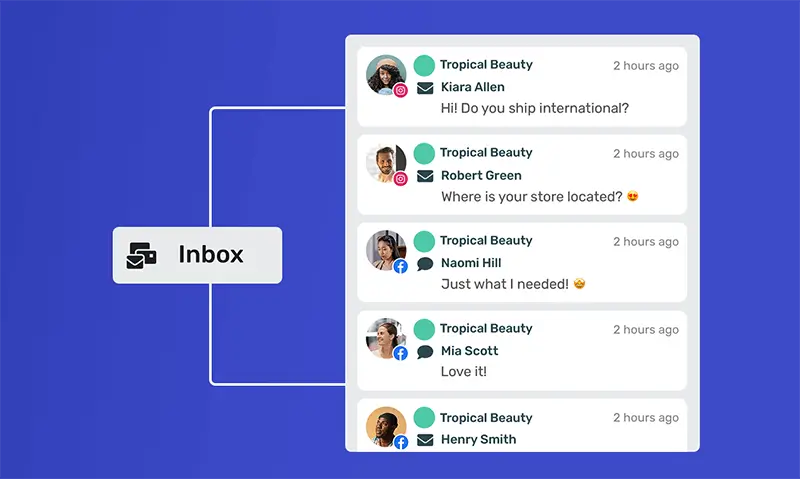
Social Inbox and Engagement
Hootsuite:
- Unified inbox for all platforms
- DM automation
- Response management
- 7-day mention history (Standard) or 30-day (Advanced)
Simplified:
- Social inbox for all messages
- Comment and DM management
- Team assignment for responses
- Full message history
Verdict: Both platforms handle engagement management. Hootsuite has more enterprise features; Simplified covers what small businesses actually use.
Analytics and Reporting

Hootsuite:
- Basic analytics on Standard tier
- Customizable reports on Advanced ($249/month)
- Competitive benchmarking
- Paid ad analytics
Simplified:
- Full social analytics at all tiers
- Engagement tracking
- Best performing content insights
- Exportable reports
Verdict: Hootsuite gates advanced analytics behind their $249/month tier. Simplified includes analytics on all plans.
Team Collaboration

Hootsuite:
- Single user on Standard tier
- Team features require Advanced tier ($249/month)
- Approval workflows on Advanced
- Per-user pricing on Enterprise ($1,800+/year per user)
Simplified:
- Multiple users included
- Team collaboration on all plans
- Approval workflows included
- No per-user pricing surprises
Verdict: Hootsuite’s team features are locked behind expensive tiers. Simplified includes collaboration without upselling.
The Real Cost Comparison
Let’s do the math on what it actually costs to run your social media marketing.
Hootsuite Stack Cost
To match Simplified’s capabilities using Hootsuite, you need:
| Tool | Monthly Cost |
|---|---|
| Hootsuite Standard | $99 |
| Canva Pro (design) | $15 |
| Jasper (AI writing) | $49 |
| Video editing tool | $20 |
| Total | $183/month |
That’s $2,196 per year for separate tools that don’t talk to each other. Every piece of content requires copying, pasting, and exporting between platforms.
Simplified Cost
| Tool | Monthly Cost |
|---|---|
| Simplified (everything) | $20 |
| Total | $20/month |
That’s $240 per year. One login. One workflow. No exports.
Annual Savings: $1,956
You could invest that money in actual marketing: ads, partnerships, content creation. Instead of paying for tool overhead.
Who Should Still Use Hootsuite
Let’s be honest, Hootsuite isn’t wrong for everyone.
Hootsuite makes sense if you:
- Manage 20+ social accounts across major platforms
- Need enterprise-level social listening and sentiment analysis
- Have dedicated social media teams (5+ people)
- Require compliance and governance features
- Already have content creation handled by a separate team
- Have budget for $249+/month for advanced features
Hootsuite doesn’t make sense if you:
- Run a small business with 1-10 employees
- Need to create AND schedule content
- Want AI writing and design in one place
- Have a limited marketing budget
- Wear multiple hats beyond just social media
- Need simplicity, not complexity
Most businesses searching for a Hootsuite alternative fall into the second category.
How to Migrate from Hootsuite to Simplified

If you’re ready to make the switch, here’s how to do it with minimal disruption.
Step 1: Export Your Content (Before Canceling)
While still on Hootsuite:
- Download your analytics reports for historical data
- Export your scheduled posts if you want to preserve them
- Save any content calendars or planning documents
Step 2: Set Up Your Brand Kit
In Simplified:
- Upload your logo and brand colors
- Add your brand fonts
- Create any standard templates you use repeatedly
- This ensures every piece of content matches your brand automatically
Step 3: Connect Your Social Accounts
In Simplified social media management:
- Connect Facebook, Instagram, LinkedIn, X/Twitter, TikTok, Pinterest
- Verify permissions for each account
- Set up your content calendar view
Step 4: Create and Schedule Your First Content
Test the end-to-end workflow:
- Use AI Writer to generate caption options
- Design your visual in the same interface
- Schedule directly to your platforms
- No exporting, no copying, no switching tools
Step 5: Cancel Hootsuite
Once you’ve confirmed everything works:
- Cancel your Hootsuite subscription before the next billing cycle
- Download any final reports or data you need
- Celebrate your $79+ monthly savings
What Users Say About Switching
Small businesses that have made the switch report:
Time Savings: “I used to spend an hour every day switching between Hootsuite, Canva, and ChatGPT. Now I do my weekly content in one sitting.” – Marketing Manager, 8-person agency
Cost Reduction: “We were paying $163/month for three tools. Now we pay $20. That’s real money back in our budget.” – Founder, eCommerce business
Simpler Workflow: “I’m not a designer or a social media expert. Simplified makes it possible to do professional work without hiring someone.” – Small business owner
Common Questions About Hootsuite Alternatives
Is Simplified as powerful as Hootsuite for scheduling?
For small business needs, yes. Both offer unlimited scheduling, content calendars, and bulk uploading. Hootsuite has more enterprise features (extensive platform support, advanced listening), but most small businesses don’t need those.
Can I schedule to all the same platforms?
Simplified supports the major platforms small businesses use: Facebook, Instagram, LinkedIn, X/Twitter, TikTok, Pinterest. Hootsuite supports more niche platforms, but if you’re only active on the main 5-7, both work.
What about the AI writing quality?
Simplified uses GPT-4 for all AI writing, the same model powering ChatGPT Plus. It handles captions, blog posts, ad copy, and more. Hootsuite’s OwlyWriter is more limited, focused mainly on caption variations.
Is there a learning curve?
Simplified was designed for small businesses who aren’t social media experts. The interface is intentionally simpler than Hootsuite’s enterprise-focused design. Most users are productive within 30 minutes.
What if I need features Simplified doesn’t have?
Be specific about what you need. If it’s advanced social listening, sentiment analysis, or managing 50+ accounts across 20 platforms, Hootsuite might still be right. If it’s content creation, design, and standard scheduling, Simplified covers it.
Other Hootsuite Alternatives to Consider
While we believe Simplified offers the best value for small businesses, here’s how other alternatives compare:
Buffer
Price: Free tier available, Pro at $6/month per channel
Best For: Solo creators who only need basic scheduling
Limitation: No design tools, no AI writing, gets expensive with multiple channels
Later
Price: $25/month for 30 posts
Best For: Instagram-focused businesses
Limitation: Post limits, no design tools, Instagram-centric
Sprout Social
Price: $249/month
Best For: Mid-size businesses with bigger budgets
Limitation: More expensive than Hootsuite, enterprise-focused
Sendible
Price: $29/month
Best For: Agencies managing multiple clients
Limitation: No content creation, scheduling only
For a detailed comparison of all these tools, see our guide on Hootsuite vs Buffer vs Simplified.
The Bottom Line: Scheduling vs. All-in-One
The question isn’t really “which scheduler is better?”
It’s: “Should I pay for a scheduler that forces me to use separate tools for content creation?”
In 2026, the answer is clearly no.
Small businesses don’t have the time or budget for subscription sprawl. They need social media management that handles creation, design, and scheduling in one place.
Hootsuite charges $99/month for scheduling. Then expects you to pay elsewhere for design and writing.
Simplified charges $20/month for scheduling, design, AI writing, video editing, and more.
The math isn’t complicated.
Key Takeaways
If you’re frustrated with Hootsuite pricing, you’re not alone. The 40%+ price increase pushed many small businesses to look for alternatives.
Hootsuite is a scheduler. That’s what you’re paying for. Content creation happens elsewhere.
All-in-one platforms eliminate tool sprawl. One subscription, one workflow, one login.
The savings are real: $1,956/year by consolidating Hootsuite + Canva + AI writing into one platform.
Migration is straightforward: Connect your accounts, set up your brand kit, and start creating.
Ready to stop overpaying for scheduling? Try Simplified free and create your first week of content before deciding.